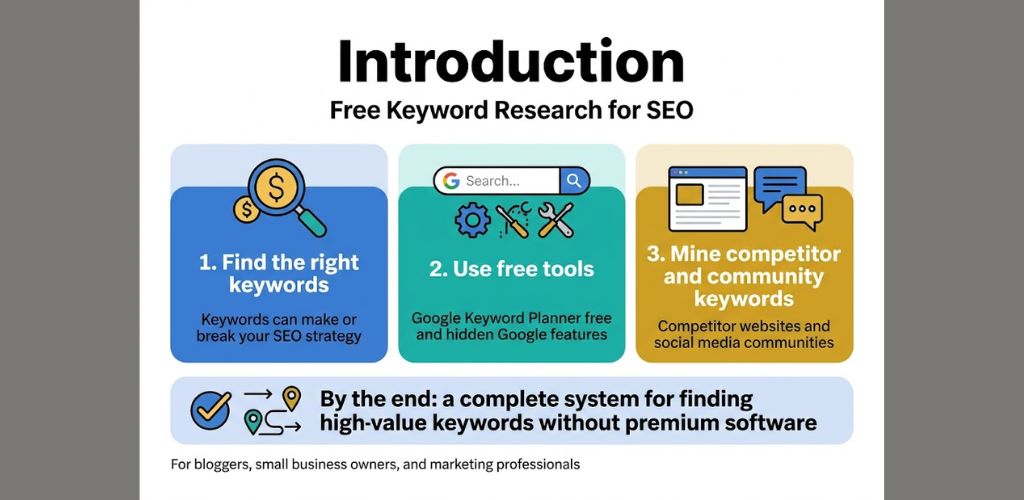
Finding the right keywords can make or break your SEO strategy, but you don’t need expensive tools to discover them. This guide shows bloggers, small business owners, and marketing professionals how to do keyword research for free using proven methods that actually work.
You’ll learn how to tap into Google’s built-in keyword tools like Google Keyword Planner free and other hidden features most people overlook. We’ll also explore powerful free third-party platforms and show you how to mine keywords from competitor websites and social media communities where your audience hangs out.
By the end, you’ll have a complete system for finding high-value keywords without spending a penny on premium software.
Table of Contents
Understanding Free Keyword Research Fundamentals
Define keyword research and its impact on SEO success
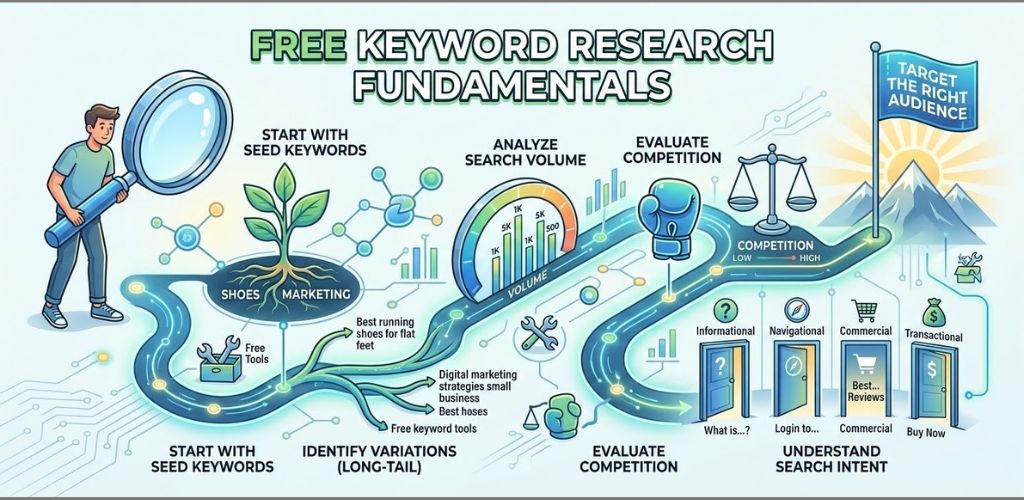
Keyword research is the process of finding and analyzing the search terms people type into search engines when looking for products, services, or information related to your business. Think of it as detective work – you’re uncovering the exact language your audience uses to find what you offer.
When you understand how to do keyword research for free, you gain the power to speak your audience’s language. Instead of guessing what people search for, you know exactly which phrases drive traffic to your competitors and which topics your target audience cares about most.
The impact on SEO success is massive. Every piece of content you create becomes laser-focused on terms people actually search for. Your website starts ranking for searches that bring qualified visitors who are ready to engage with your content or buy your products. Without proper keyword research, you’re essentially shooting in the dark, creating content that might never be found.
Free keyword research gives small businesses and solo entrepreneurs the same foundational insights that big companies get from expensive tools. You can discover low-competition keywords, understand search intent, and build content strategies that compete with much larger competitors.
Identify the difference between free and paid keyword tools
Free keyword research methods provide essential data without the monthly subscription fees. Tools like Google Keyword Planner, Answer the Public, and Ubersuggest’s free tier give you search volume estimates, related keywords, and basic competition insights. These tools cover the fundamentals you need to build an effective keyword strategy.
| Feature | Free Tools | Paid Tools |
|---|---|---|
| Search Volume | Basic ranges | Precise numbers |
| Keyword Ideas | 10-100 suggestions | 1000+ suggestions |
| Competition Analysis | Limited data | Detailed metrics |
| Historical Trends | Basic overview | Multi-year analysis |
| Export Options | Limited/None | Unlimited exports |
Paid tools like SEMrush, Ahrefs, and premium versions of free tools offer deeper insights, more precise data, and advanced features like keyword difficulty scores, SERP analysis, and competitor keyword gaps. They also provide unlimited searches and detailed historical data.
However, free SEO keyword tools still deliver tremendous value. Google Keyword Planner shows you the same search volume data that Google Ads advertisers see. Answer the Public reveals questions people ask about your topics. Even Ubersuggest free keyword research provides solid keyword suggestions and basic metrics.
Set realistic expectations for free keyword research results
Free keyword research methods won’t give you every insight that expensive tools provide, but they absolutely deliver enough information to build successful SEO strategies. You’ll get solid keyword ideas, understand search intent, and identify content opportunities that can drive real traffic growth.
Expect to spend more time manually gathering data from multiple sources rather than getting everything in one dashboard. You might check Google Keyword Planner for search volumes, use Answer the Public for question-based keywords, and browse Reddit or Quora for conversation topics. This scattered approach takes longer but costs nothing.
Your keyword lists will be smaller compared to paid tools, but quality matters more than quantity. Finding 20-30 solid keywords you can actually rank for beats having 500 keywords you’ll never compete for successfully.
Search volume data from free tools often shows ranges rather than exact numbers. Instead of seeing “1,200 monthly searches,” you might see “1K-10K searches.” This broader range still helps you prioritize keywords and make informed content decisions.
The biggest limitation is competitive analysis depth. While you can identify which keywords competitors rank for using free methods, you won’t get detailed metrics about their ranking difficulty or content gaps. You’ll need to rely more on manual analysis and common sense to evaluate keyword opportunities.
Free tools also have usage limits. Google Keyword Planner requires a Google Ads account and works best when you’re running campaigns. Ubersuggest limits daily searches on their free plan. Plan your research sessions around these constraints rather than fighting them.
Leverage Google’s Built-in Keyword Tools
Master Google Search autocomplete suggestions
Google’s autocomplete feature serves as a goldmine for free keyword research. When you start typing in the search bar, Google automatically suggests popular searches based on what millions of users search for daily. These suggestions reveal real search intent and help you discover valuable long-tail keywords without spending a dime.
Start by typing your main keyword into Google’s search box and observe the dropdown suggestions. For example, typing “keyword research” might show suggestions like “keyword research for beginners,” “keyword research tools,” or “keyword research process.” Each suggestion represents actual search queries people use, making them perfect keyword opportunities.
Try different variations and related terms. If you’re researching “SEO,” also try “search engine optimization,” “website ranking,” or “organic traffic.” Google often suggests different angles and related topics you might not have considered.
Use the alphabet soup method by adding letters after your main keyword. Type “keyword research a” then “keyword research b” and so on. This technique uncovers numerous keyword variations across different topics and search intents.
Don’t forget about the “People also ask” section that appears in search results. These questions reveal what your audience wants to know and provide excellent content ideas and keyword opportunities.
Google Trends for keyword popularity insights
Google Trends offers powerful insights into keyword popularity over time, helping you identify rising trends and seasonal patterns. This free tool shows you whether a keyword is gaining or losing popularity, which is crucial for timing your content strategy.
Enter your target keywords into Google Trends to see their search volume trends over the past five years. You can compare up to five keywords simultaneously to understand which terms perform better. Look for keywords showing steady growth or consistent seasonal spikes.
The “Related queries” section in Google Trends reveals breakout keywords and rising search terms related to your topic. These emerging keywords often present excellent opportunities to get ahead of the competition before these terms become highly competitive.
Use the geographic data to understand where your keywords are most popular. If you’re targeting specific regions or countries, this information helps you focus your efforts on areas where your keywords have the strongest appeal.
The “Related topics” feature suggests broader themes connected to your keywords, helping you expand your keyword research into related niches and topics you might have overlooked.
Extract keywords from Google Search Console data
Google Search Console provides invaluable keyword data directly from Google, showing exactly which search queries bring visitors to your website. This first-party data reveals keywords you’re already ranking for and identifies opportunities for improvement.
Navigate to the “Performance” section in Search Console to see your search queries report. This shows all the keywords that triggered your website to appear in search results, along with impressions, clicks, click-through rates, and average positions.
Focus on keywords where you have high impressions but low click-through rates. These represent opportunities where you’re already visible but could improve your title tags and meta descriptions to attract more clicks.
Look for keywords ranking on page two (positions 11-20). These keywords are close to breaking through to page one, and with some optimization effort, you can often boost their rankings significantly.
Pay attention to keywords with high impressions but low average positions. These indicate topics where Google sees your content as relevant but not quite authoritative enough. Creating more comprehensive content around these topics can help improve your rankings.
The Search Console data also reveals seasonal trends in your own traffic, helping you plan content calendars around keywords that perform well at specific times of the year.
Analyze competitor keywords through Google search results
Google search results themselves provide a wealth of competitor keyword intelligence. By analyzing who ranks for your target keywords, you can reverse-engineer their keyword strategies and find gaps in their coverage.
Search for your target keywords and examine the top 10 results. Look at the titles, meta descriptions, and URL structures of ranking pages. These elements often reveal the exact keywords competitors are targeting.
Use Google’s site search operator to explore competitor websites. Type “site:competitorwebsite.com” followed by your target keyword to see which pages on their site target that term. This reveals their content strategy and keyword focus.
Check the “People also search for” suggestions that appear when you click back from a search result. These related searches show you additional keywords in your niche that users commonly explore.
Examine competitor blog categories and tags, which often reveal their keyword targeting strategy. Many websites organize their content around specific keyword themes, giving you insights into their SEO approach.
Study the featured snippets and “People also ask” sections for your target keywords. The content that appears here shows you what Google considers the most relevant and comprehensive coverage of these topics, helping you understand what kind of content ranks well for specific keywords.
Harness Free Third-Party Keyword Research Platforms
Maximize Ubersuggest’s free tier capabilities
Ubersuggest stands out as one of the most generous free keyword research tools available today. The platform offers three free searches daily, giving you access to comprehensive keyword data without spending a penny. When you enter your target keyword, you’ll get search volume estimates, keyword difficulty scores, and seasonal trend data that typically costs money on other platforms.
The tool’s keyword suggestions feature reveals hundreds of related terms, long-tail variations, and question-based queries people actually search for. Pay special attention to the “Related” tab, which uncovers keywords you might never have considered. The search volume data helps you identify which terms are worth targeting, while the difficulty score prevents you from chasing impossible keywords.
Ubersuggest’s content ideas section shows you what’s already ranking for your target keywords. This gives you a clear picture of the competition and helps you spot content gaps where you can create better, more comprehensive articles.
Explore AnswerThePublic for question-based keywords
AnswerThePublic transforms your basic keywords into a goldmine of question-based search terms. This visual keyword tool shows you exactly what questions people ask about your topic, organized in an easy-to-read wheel format.
The platform captures real search queries from Google’s autocomplete feature, giving you authentic insights into user intent. You’ll discover how people phrase their problems, what specific information they seek, and which angles your content should address.
Each search reveals questions starting with who, what, when, where, why, and how. These question-based keywords often have lower competition and higher conversion rates because they target people actively seeking solutions. The tool also shows prepositions (for, can, near, with) and comparisons (versus, like, or) that reveal additional keyword opportunities.
Save the visual reports as images or download the data as CSV files to analyze later. The alphabetical listings make it easy to spot patterns in search behavior and identify content topics that directly address user needs.
Use Keyword Surfer browser extension for search volume data
Keyword Surfer brings keyword research directly into your Google search experience. This free Chrome extension displays search volume data right in Google’s search results, eliminating the need to switch between different tools and platforms.
When you search for any term, the extension shows monthly search volumes for your main keyword plus related suggestions in the sidebar. You’ll see search volumes for different countries, helping you understand geographic variations in keyword popularity.
The extension also reveals search volume data for the keywords that competing pages are ranking for. Click on any search result, and Keyword Surfer shows you which terms that page is targeting. This competitive insight helps you identify keywords you might have missed and understand what’s working for successful pages in your niche.
The tool estimates word count requirements by analyzing top-ranking pages, giving you content length targets that improve your chances of ranking well.
Discover keywords with Google Keyword Planner’s free features
Google Keyword Planner remains one of the most reliable sources for free keyword research, despite requiring an AdWords account setup. The tool provides search volume ranges, competition levels, and seasonal trends directly from Google’s vast search database.
Start with the “Discover new keywords” feature by entering your seed keywords or website URL. The tool generates hundreds of relevant keyword suggestions along with their search volume ranges and competition indicators. While the exact search volumes require ad spend, the ranges still provide valuable guidance for keyword selection.
The historical metrics and forecasts section reveals seasonal trends and long-term keyword performance. This data helps you plan content calendars around peak search periods and avoid targeting keywords that are declining in popularity.
Use the location and language targeting features to find keywords specific to your geographic market. This local keyword data becomes particularly valuable for businesses serving specific regions or countries where free seo keyword tools india or other location-specific searches matter most.
Extract Keywords from Social Media and Online Communities
Mine Facebook Groups for Trending Topic Keywords
Facebook groups represent goldmines for discovering what real people are actually searching for. Join groups related to your niche and pay attention to the questions members ask and the language they use. These conversations reveal genuine search intent that you won’t find anywhere else.
Look for groups with active discussions around your topic area. Members often phrase their problems in ways that directly translate to search queries. For example, in a gardening group, someone might ask “Why are my tomato leaves turning yellow in summer?” – that’s a potential long-tail keyword right there.
Save posts that get high engagement, as these indicate trending topics in your industry. The comments sections are particularly valuable since they contain natural language variations of the main topic. Screenshot or bookmark these conversations for later keyword analysis.
Don’t just lurk – engage authentically. Ask questions that help you understand the pain points and terminology your audience uses. This approach to free keyword research methods gives you insights that even expensive tools can’t provide.
Discover Long-Tail Keywords from Reddit Discussions
Reddit’s structure makes it perfect for keyword research without semrush or other paid platforms. Each subreddit focuses on specific topics, giving you concentrated pools of relevant conversations. The search function lets you find discussions around particular themes, while the upvote system highlights the most valuable content.
Start by identifying subreddits related to your niche. Use Reddit’s search bar to look for posts containing broad keywords related to your topic. Pay special attention to:
- Post titles with high upvotes
- Questions that generate lots of comments
- Recurring themes across multiple posts
- Specific problems people mention repeatedly
The beauty of Reddit lies in its honest, unfiltered discussions. People describe their problems using everyday language, which often becomes the exact phrases they type into Google. A post titled “Best budget laptop for college students under $500” reveals multiple keyword opportunities.
Sort posts by “Top” and “Hot” to find trending discussions. The comment threads often contain even more specific variations of the main topic. Create a list of questions and phrases that appear frequently – these become your keyword targets.
Analyze Twitter Hashtags for Real-Time Keyword Trends
Twitter’s fast-paced nature makes it excellent for spotting emerging trends before they explode on other platforms. Hashtags naturally cluster around topics, making them perfect keyword discovery tools for those learning how to do keyword research for free.
Start with broad hashtags related to your industry, then dive into the conversations. Notice which hashtags appear together frequently – these combinations often reveal multi-keyword phrases people might search for. Twitter’s trending section shows what’s hot right now in your location or worldwide.
Use Twitter’s advanced search to find tweets containing specific keywords. Look for patterns in how people discuss topics. The 280-character limit forces users to be concise, often creating the exact phrases they’d use in search engines.
| Twitter Feature | Keyword Research Benefit |
|---|---|
| Trending hashtags | Discover rising search terms |
| Tweet replies | Find question variations |
| Retweets with comments | See different perspectives on topics |
| Twitter polls | Understand audience preferences |
Monitor industry influencers and see which hashtags they use consistently. Their followers often adopt similar language, creating keyword opportunities. Twitter Analytics (free with any account) shows which hashtags perform best, indicating strong search potential.
Save tweets that resonate with large audiences. The language used in viral tweets often translates well to search queries since it captures attention quickly and communicates clearly.
Analyze Competitor Websites for Keyword Opportunities
Study Competitor Page Titles and Meta Descriptions
Your competitors’ page titles and meta descriptions are goldmines for discovering valuable keywords without spending a dime. Start by identifying your top 5-10 competitors and systematically examine their website structure.
Visit their main pages and blog sections, then right-click and select “View Page Source” or use browser extensions like MozBar or SEO Meta in 1 Click. Look for patterns in their title tags and meta descriptions – these elements reveal the keywords they’re targeting for search engines.
Pay special attention to:
- Primary keywords appearing in title tags
- Long-tail keyword phrases in meta descriptions
- Repeated keyword patterns across multiple pages
- Location-based keywords for local businesses
- Action words and modifiers they frequently use
Create a spreadsheet to track these findings, noting which keywords appear most frequently across competitor sites. This method helps you understand keyword priorities in your niche and reveals search terms you might have overlooked.
Examine Competitor Blog Post Topics and Structures
Competitor blog content reveals their content strategy and target keywords. Browse through their blog archives and analyze their most popular posts by checking social media shares, comments, and backlinks using free tools like Backlink Checker from Ahrefs (limited free version).
Study their blog post structures to understand:
- How they organize content around specific keywords
- Question-based titles that target voice search queries
- Seasonal content patterns and trending topics
- Content length and keyword density approaches
Look at their category pages and tag systems – these often reveal their keyword groupings and content clusters. Many competitors unknowingly show their keyword research through their content organization.
Take note of their posting frequency and content types. Some competitors might focus heavily on “how-to” content, while others prioritize comparison posts or industry news. This analysis helps you spot content formats that perform well for specific keywords in your industry.
Identify Content Gaps in Competitor Keyword Strategies
While analyzing competitor content, you’ll discover keyword opportunities they’ve missed entirely. These content gaps represent your biggest chances to rank for valuable terms without facing established competition.
Look for:
- Subtopics within their main content themes that they haven’t covered
- Questions in their comment sections that remain unanswered
- Related keywords from Google’s “People also ask” section that they haven’t targeted
- Emerging industry trends they haven’t addressed yet
Use Google search operators like “site:competitorwebsite.com [your keyword]” to see if they’ve covered specific topics. If Google returns no results, you’ve found a potential content gap.
Cross-reference multiple competitors to find consistent gaps across your industry. When several major players miss the same keyword opportunities, it often indicates less competition and easier ranking potential.
Monitor Competitor Social Media Content for Keyword Ideas
Social media platforms offer real-time insights into trending keywords and topics your competitors are targeting. Follow your competitors across Facebook, Twitter, LinkedIn, Instagram, and industry-specific platforms.
Pay attention to:
- Hashtags they use consistently
- Questions their audience asks in comments
- Topics that generate high engagement
- Language patterns in their most shared posts
Use platform search functions to see what keywords competitors rank for within social networks. LinkedIn and Twitter searches can reveal professional terminology and industry jargon that makes great long-tail keywords.
Monitor their social media advertising (visible in Facebook Ad Library) to see which keywords they’re bidding on. This gives you insight into their paid keyword strategy, which often mirrors their organic keyword targets.
Create alerts using Google Alerts or social media monitoring tools like Hootsuite’s free plan to track when competitors post about specific topics. This helps you stay updated on their keyword focus and content timing strategies.
Organize and Prioritize Your Free Keyword Research Data
Create keyword groupings by search intent and topics
After collecting keywords through free methods, organize them into meaningful groups based on search intent and related topics. This approach helps you understand what your audience actually wants when they search for specific terms.
Start by categorizing keywords into four main search intent types:
- Informational keywords: Users seeking knowledge (how-to guides, tutorials, definitions)
- Navigational keywords: Users looking for specific websites or brands
- Commercial keywords: Users researching products or services before buying
- Transactional keywords: Users ready to make a purchase or take action
Create separate spreadsheets or document sections for each category. For example, if you’re researching “free keyword research methods,” informational keywords might include “what is keyword research” or “keyword research basics,” while transactional keywords could be “keyword research tool free trial” or “download free keyword tool.”
Group related keywords by topic clusters. If you have keywords like “Google Keyword Planner free,” “how to use Google Ads for keywords,” and “Google search console keyword data,” bundle these under a “Google Tools” cluster. This grouping reveals content opportunities and helps identify gaps in your keyword strategy.
Use color coding or tags to make your groups visually distinct. This system becomes invaluable when planning content calendars or identifying which keywords to target together on the same page.
Evaluate keyword difficulty using free assessment methods
Without paid tools, you can still gauge keyword difficulty through manual research techniques that provide reliable insights into competition levels.
Check the first page of Google search results for your target keywords. Look for these indicators of high difficulty:
- Domain authority signals: Major brands, Wikipedia, government sites, or established industry leaders dominating results
- Content depth: Long-form, comprehensive articles with extensive research and multimedia
- Page optimization: Well-structured content with clear headings, meta descriptions, and keyword usage
Count how many results Google returns for exact-match searches using quotation marks. Fewer results often indicate lower competition, though this method works best for long-tail keywords.
Analyze the top 10 results manually:
| Difficulty Level | Difficulty Level | Your Strategy |
|---|---|---|
| Low | Small websites, thin content, poor optimization | Target immediately |
| Medium | Mix of established and newer sites, decent content | Consider with quality content |
| High | Major brands, comprehensive content, strong backlinks | Focus on long-tail variations |
Use Google’s “related searches” and autocomplete suggestions to find easier keyword variations. If “Ubersuggest free keyword research” appears too competitive, try “Ubersuggest alternative free” or “free keyword tools like Ubersuggest.”
Social media search volumes can indicate popularity. Search your keywords on platforms like Twitter, Reddit, or YouTube to see engagement levels and discussion frequency.
Build a keyword priority matrix based on relevance and opportunity
Create a simple scoring system to rank keywords objectively. This matrix helps you focus on keywords that offer the best return on your content creation efforts.
Set up a basic spreadsheet with these columns:
- Keyword
- Search Volume Estimate (High/Medium/Low)
- Difficulty Score (1-10)
- Relevance to Business (1-10)
- Current Ranking Position
- Priority Score
For search volume without paid tools, use Google Keyword Planner’s broad ranges or compare relative volumes by testing keywords in Google Trends. Look for trending upward patterns over 12 months.
Score relevance based on how closely each keyword aligns with your business goals. A local business might give “find keywords without tools” a lower relevance score than “free SEO keyword tools India” if they’re targeting Indian customers specifically.
Calculate priority scores using this simple formula:
(Relevance Score × Search Volume) ÷ Difficulty Score
Keywords with scores above 5 typically deserve immediate attention, while those scoring 2-5 can fill your content pipeline for later. Anything below 2 might need reconsideration unless they serve specific strategic purposes.
Review and update your matrix monthly. Search trends change, and your content success will shift difficulty scores over time. Track which keywords actually drive traffic and conversions, then adjust your scoring system based on real performance data rather than estimates alone.
Step-by-step guide to doing keyword research without paid software?
Identifying popular search queries using a major search engine’s features
Google’s autocomplete feature serves as one of the most powerful free tools for discovering what people actually search for. Start typing your main topic into Google’s search box and watch the dropdown suggestions appear. These suggestions come directly from real user searches, making them incredibly valuable for free keyword research methods.
The “People also ask” section provides another goldmine of keyword opportunities. When you search for any term, Google displays related questions that users frequently ask. Each question represents a potential long-tail keyword you can target. Click on these questions to reveal even more related queries.
Google’s related searches at the bottom of search results pages offer additional keyword variations. These suggestions help you discover different ways people phrase their search queries around your topic. This approach works exceptionally well for finding keywords without tools.
Google Trends adds another layer of insight by showing search volume patterns over time. You can compare multiple keywords, see seasonal trends, and identify rising search terms. The platform also reveals related topics and queries that are gaining popularity in your niche.
Which free services offer accurate search volume data for keywords?
Google Keyword Planner free remains the most reliable source for search volume data, though it requires a Google Ads account. The tool provides monthly search volume ranges rather than exact numbers for free users, but these ranges still offer valuable insights for prioritizing keywords.
Ubersuggest free keyword research allows up to three searches per day without creating an account. The platform displays search volume estimates, keyword difficulty scores, and related keyword suggestions. While the free version has limitations, it provides enough data to make informed decisions about keyword targeting.
AnswerThePublic generates hundreds of keyword suggestions organized around question-based searches. Though it doesn’t provide search volume data, it excels at revealing how people phrase their queries naturally.
| Tool | Search Volume Data | Daily Limits | Account Required |
|---|---|---|---|
| Google Keyword Planner | Volume ranges | Unlimited | Yes (Google Ads) |
| Ubersuggest | Estimated volumes | 3 searches | No |
| AnswerThePublic | No volume data | 3 searches | No |
| Google Trends | Relative popularity | Unlimited | No |
Are there browser add-ons for free keyword suggestions?
Keywords Everywhere offers a freemium browser extension that displays search volume and competition data directly in Google search results. While the premium features require credits, the basic functionality helps identify keyword opportunities as you browse.
SEOquake provides comprehensive SEO metrics including keyword suggestions when you visit any webpage. The extension analyzes page content and suggests related keywords based on what competitors are targeting.
MozBar displays domain authority and page authority metrics for any website, helping you assess keyword competition levels. Though primarily an SEO analysis tool, it provides context for evaluating whether you can realistically rank for specific keywords.
The SimilarWeb extension reveals website traffic data and popular search terms driving visitors to competitor sites. This insight helps you discover keyword research without semrush by analyzing what works for others in your industry.
Chrome’s built-in developer tools can extract valuable keyword data from competitor websites. Right-click any page, select “View Page Source,” and search for meta keywords, title tags, and heading structures to identify target keywords.
These browser extensions streamline the how to do keyword research for free process by bringing keyword data directly to your regular browsing experience. You can gather insights while researching competitors, reading industry content, or exploring potential topics for your own content strategy.
FAQ’s
How can I perform keyword research for free using popular online tools?
Google Keyword Planner remains the gold standard for free keyword research methods. Access it through Google Ads (no campaign required) to discover search volumes, competition levels, and related terms. Simply create an account, skip the campaign setup, and navigate to Tools & Settings. The interface shows monthly search volumes and suggests similar keywords that might work better for your content.
Ubersuggest offers generous free limits that make ubersuggest free keyword research incredibly valuable. You get three searches daily without paying, which reveals keyword difficulty, search volume trends, and content ideas. The platform also shows you what keywords your competitors rank for, giving you a roadmap to follow.
Answer The Public visualizes questions people ask about your topics. Type in your main keyword and watch as it generates hundreds of question-based keywords perfect for blog content and FAQ sections. These question keywords often have less competition and higher conversion rates.
Google Trends helps you understand keyword popularity over time and across different regions. It’s perfect for identifying seasonal trends and comparing multiple keywords to see which ones are gaining momentum.
Soovle aggregates suggestions from Google, YouTube, Amazon, and other platforms simultaneously. This multi-platform approach helps you discover keywords you might miss when focusing on just one search engine.
Keyword Sheeter generates hundreds of keyword ideas from Google Autocomplete. Though basic, it provides raw material you can filter and analyze using other free tools.
> How to begin keyword research without spending money
Start with brainstorming sessions around your main topic. Write down every word or phrase your target audience might use when searching for your content. Think about problems they’re trying to solve, questions they’re asking, and the language they use in everyday conversation.
Google’s search suggestions become your next goldmine. Type your main keyword into Google and note the autocomplete suggestions that appear. These represent real searches people perform daily. Scroll to the bottom of search results to find “related searches” – another treasure trove of keyword ideas.
Use your existing content as a foundation. Look through your blog posts, product descriptions, and customer emails to identify terms you’re already using naturally. These authentic phrases often perform better than artificially optimized keywords.
Examine your website analytics if you have them set up. Google Analytics shows which keywords already bring visitors to your site, helping you double down on what’s working and find similar opportunities.
Create seed keyword lists by category. Organize your initial brainstorming into themes, then use free tools to expand each category systematically. This methodical approach ensures you don’t miss important keyword opportunities.
Document everything in a simple spreadsheet. Track search volume estimates, competition levels, and your assessment of how relevant each keyword is to your content goals.
> What are the best free platforms to find keyword ideas for SEO?
Google Search Console stands out as the most accurate free SEO keyword tools option because it shows actual performance data from your website. The Performance report reveals which queries bring visitors to your site, their click-through rates, and average positions. This real-world data beats estimates from other tools.
YouTube’s search suggestions work brilliantly for video content and blog topics. YouTube is the world’s second-largest search engine, and its autocomplete feature reveals what people want to watch and learn about. These video-focused keywords often translate well to written content.
Reddit and Quora serve as keyword research goldmines disguised as community platforms. Search for your topic and read through discussions to understand the exact language your audience uses. Pay attention to recurring questions and problems people mention repeatedly.
Pinterest Trends shows seasonal keyword patterns and emerging topics, especially valuable for lifestyle, DIY, and visual content creators. The platform’s search suggestions also reveal long-tail keywords that might not appear in traditional SEO tools.
Wikipedia provides semantic keyword ideas through its comprehensive coverage of topics. Read articles related to your niche and note the terms, synonyms, and related concepts mentioned throughout. The “See Also” sections often contain relevant keyword opportunities.
Amazon’s search bar helps with product-related keywords and commercial intent terms. Even if you’re not selling products, understanding what people search for on Amazon reveals their buying mindset and the language they use when ready to purchase.
Free keyword research doesn’t have to break the bank or require expensive subscriptions. Google’s own tools, social media platforms, competitor websites, and free third-party resources give you everything you need to find valuable keywords that can drive traffic to your site. The key is knowing where to look and how to organize what you find into actionable data that actually moves the needle for your content strategy.
Start with Google’s free tools like Keyword Planner and autocomplete suggestions, then branch out to platforms like Answer the Public, Reddit, and your competitors’ websites. Take the time to organize your findings and focus on keywords that match your audience’s search intent. With a little creativity and consistent effort, you can build a solid keyword strategy that rivals what paid tools offer – you just need to roll up your sleeves and dig in.